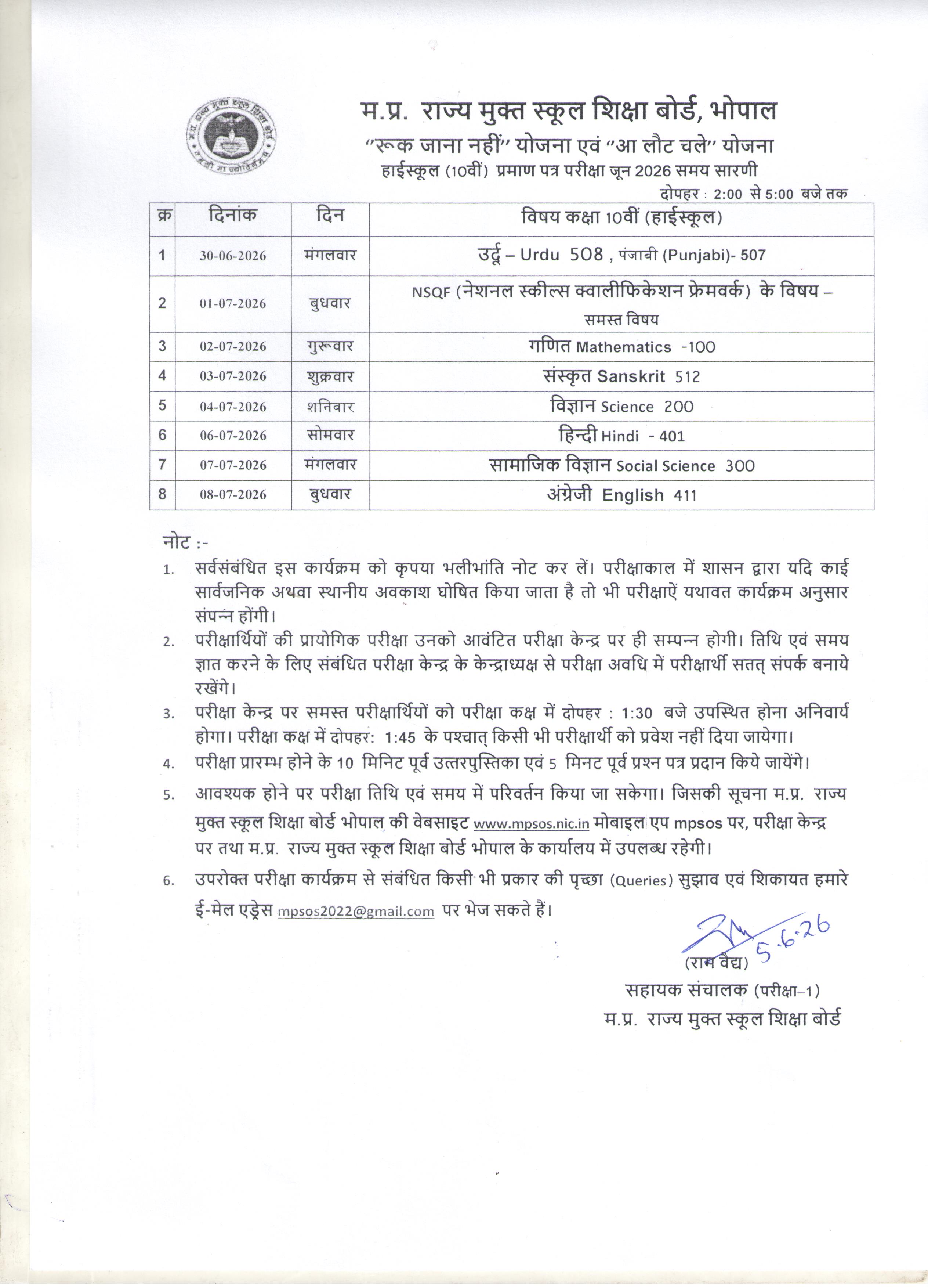
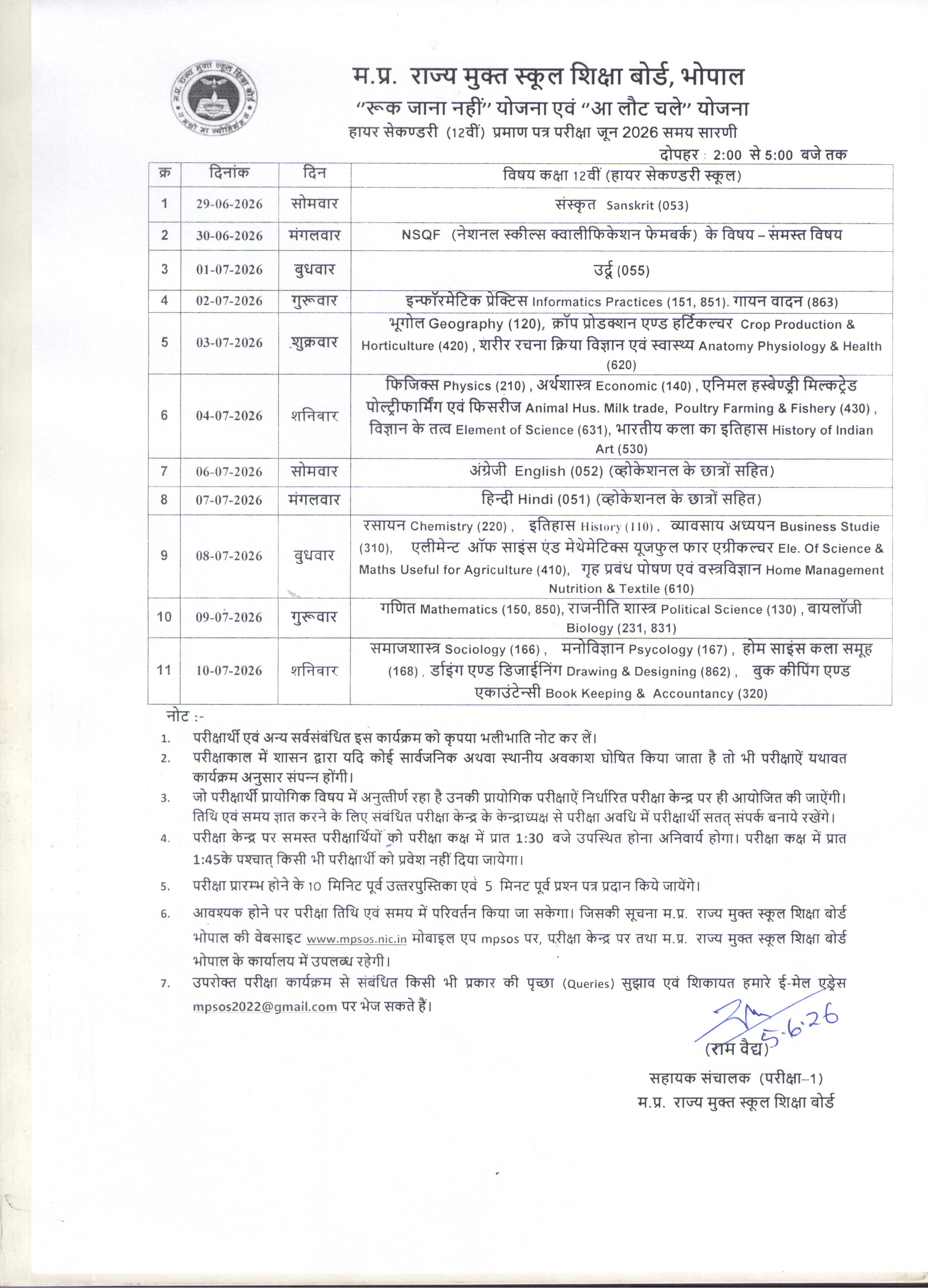
MPSOS Time Table 2026 Released - Download Class 5th, 8th, 10th & 12th Exam Schedule (July 2026)
Madhya Pradesh State Open School (Website)
Location: Madhya Pradesh
Job Description
Overview
The Madhya Pradesh State Open School (MPSOS) has officially published the examination schedule for the July 2026 session. This release covers various academic levels, including primary, middle, secondary, and higher secondary courses, providing students with the necessary timeline to prepare for their upcoming assessments.
Key Responsibilities
- Students must verify their specific exam dates based on their enrolled category and class level.
- Candidates are required to download the official timetable directly from the authorized portal to ensure accuracy.
- It is essential for examinees to cross-reference their subject-wise schedule with their admit cards once issued.
- Learners should organize their study plans according to the gaps provided between individual papers.
- Participants must keep their registration details and roll numbers accessible for future exam-related processes.
- Regular monitoring of the official website is advised to stay informed about any potential schedule adjustments.
Why Apply
The MPSOS examination system offers a vital second chance for students to complete their education through a flexible, open-learning framework. This initiative supports academic continuity for those unable to attend traditional schooling, ensuring they can achieve their educational milestones.
Important Dates
- Exam Session: July 2026
Quick Facts
- Organization: Madhya Pradesh State Open School
- Exam Type: Open School, RJN/ALC, CBSE On Demand
- Location: Madhya Pradesh
- Category: Education/Exam Schedule
Selection Process
The examination process for MPSOS is conducted in accordance with the guidelines set by the Madhya Pradesh State Open School. Students are evaluated based on their performance in the theory papers scheduled for the July 2026 session. The assessment criteria vary depending on the specific class level and the scheme under which the student is enrolled, such as Open School, RJN/ALC, or CBSE On Demand. Candidates must secure the minimum qualifying marks in each subject to successfully pass their respective grade level.
Vacancy Details
| Exam Category | Class |
| RJN/ALC | 10th & 12th |
| Open School | 5th, 8th, 10th & 12th |
| CBSE On Demand | 12th |
How to Apply
- Navigate to the official MPSOS website at mpsos.nic.in.
- Locate the 'Time Table' section on the main homepage.
- Select the link that corresponds to your specific exam category and class level.
- The schedule will display as a JPG image file in your browser.
- Right-click the image to save it to your device or take a screenshot for offline access.
- Ensure you keep a digital or printed copy of the timetable for your reference throughout the exam period.
Detailed Notification Link
| RJN/ALC 10th | View Notification |
| RJN/ALC 12th | View Notification |